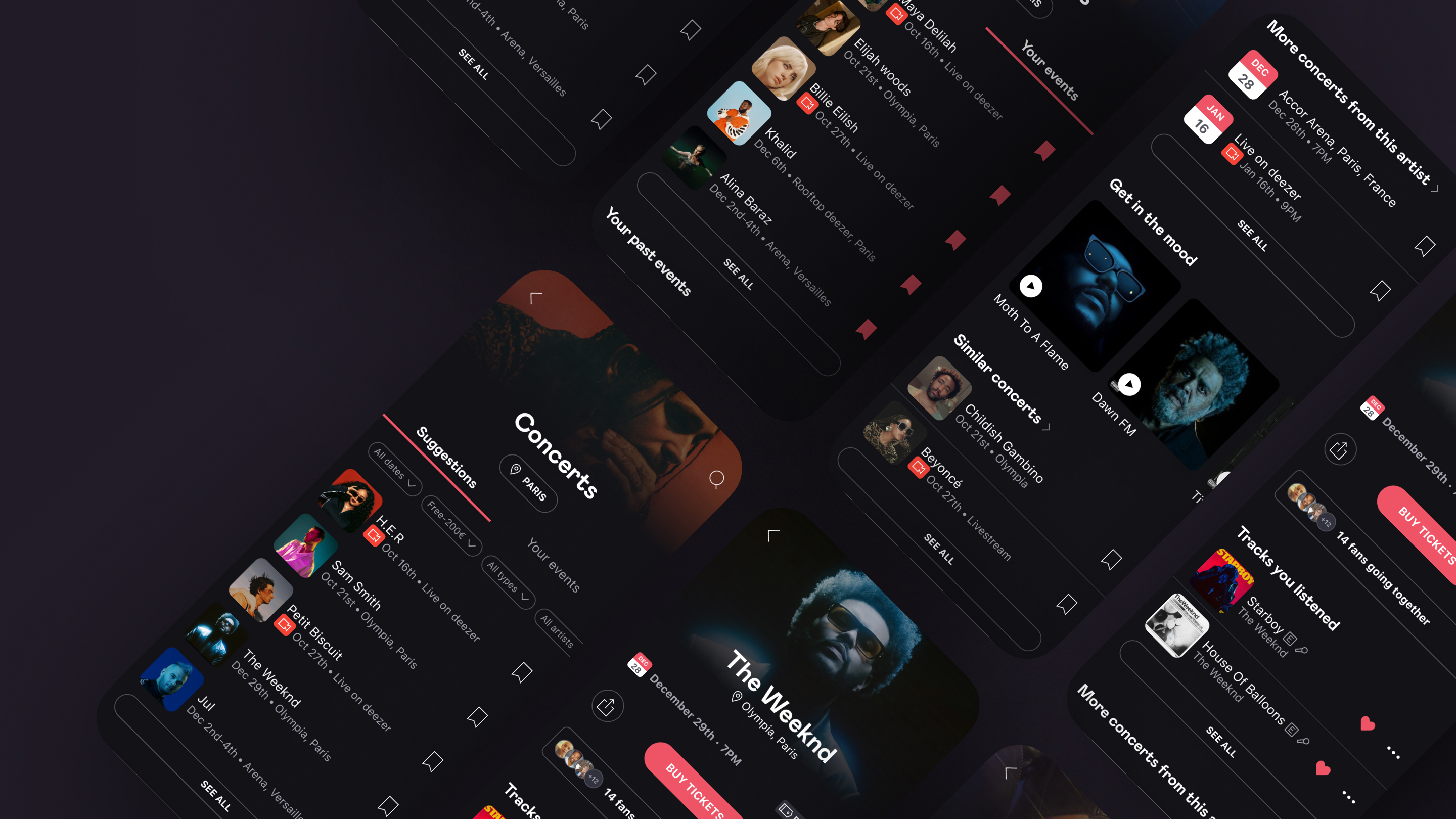
Concert Hub
✕
Overview
Impact
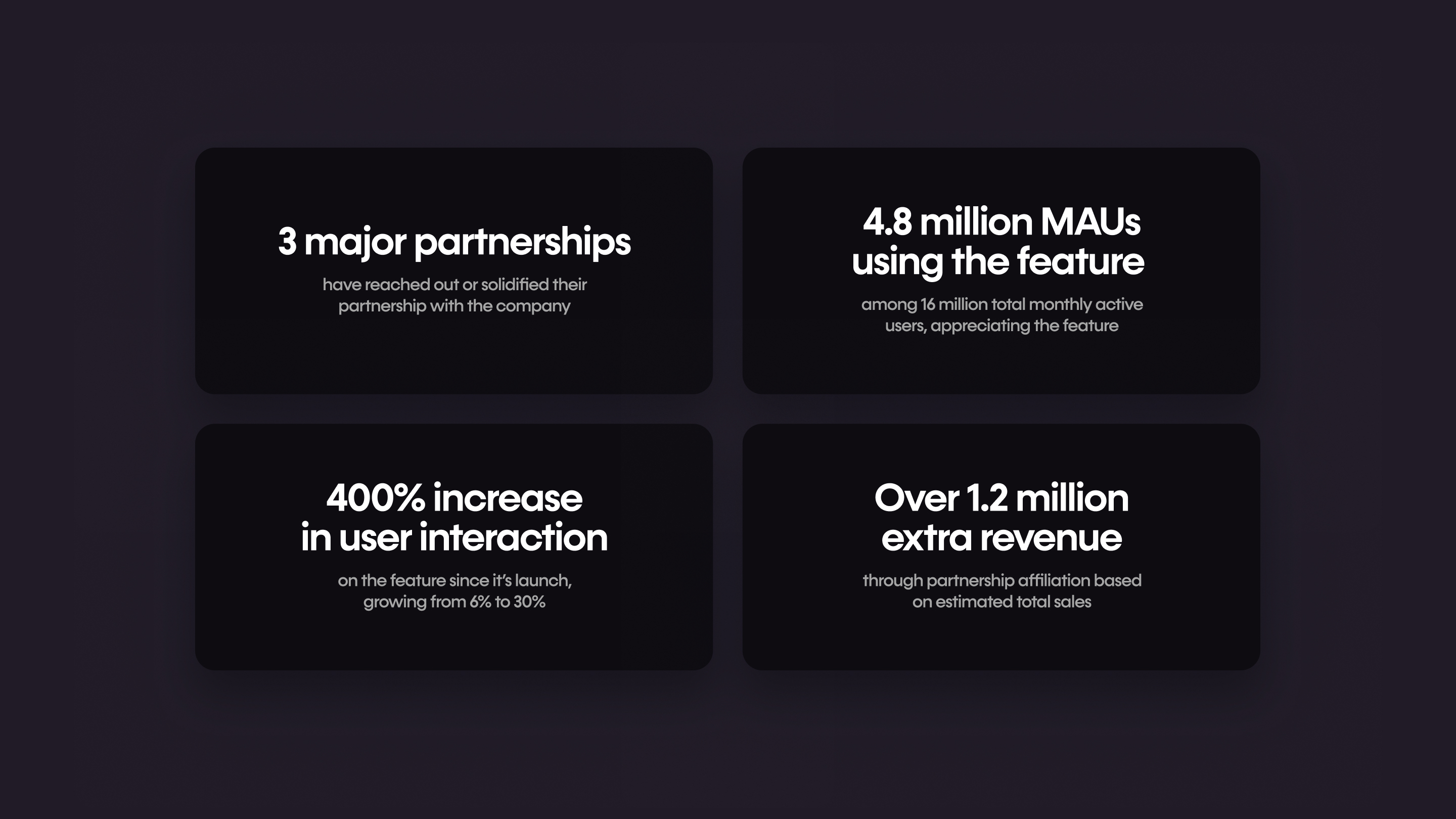
Revamping and providing a new concert search and ticket purchase journey led to a 400% increase in user interaction on the feature since its launch, growing from 6% to 30%. As a result, 4.8 million of the total 16 million monthly active users are now using the feature, showing significant appreciation for it. This project has solidified partnerships with major ticket platforms such as Ticketmaster, Fnac, and France Billet. Over 1.2 million in monthly revenue is expected based on estimated total sales through partnership affiliations.
Contribution
My role involved researching the reasons behind the ineffectiveness of the previous concert experience. Collaborating with a cross-functional team of product managers, engineers, user researchers, and marketers, I designed a new user journey to enhance the pre- and post-concert/virtual live event experiences on Deezer.
Analysis
Context
A concert is a rich and immersive experience of enjoying live music. As users develop an affinity for certain artists, they often seek out information about upcoming concerts. On Deezer, a music streaming app, concert information was available. However, due to a hidden entry point and an unoptimized structure, many users were unaware of its existence.
Needs
By spotlighting concert and livestream events as a new feature, the company realized that the existing concert experience on Deezer was underperforming. The entry point for the concert feature was difficult to find, and users were not informed about their favorite artists coming to town. Additionally, the details provided on the concert page did not meet users’ needs. As a result, users sought a more straightforward way to discover, purchase, and enjoy concerts they were interested in outside of the app.
Business opportunity
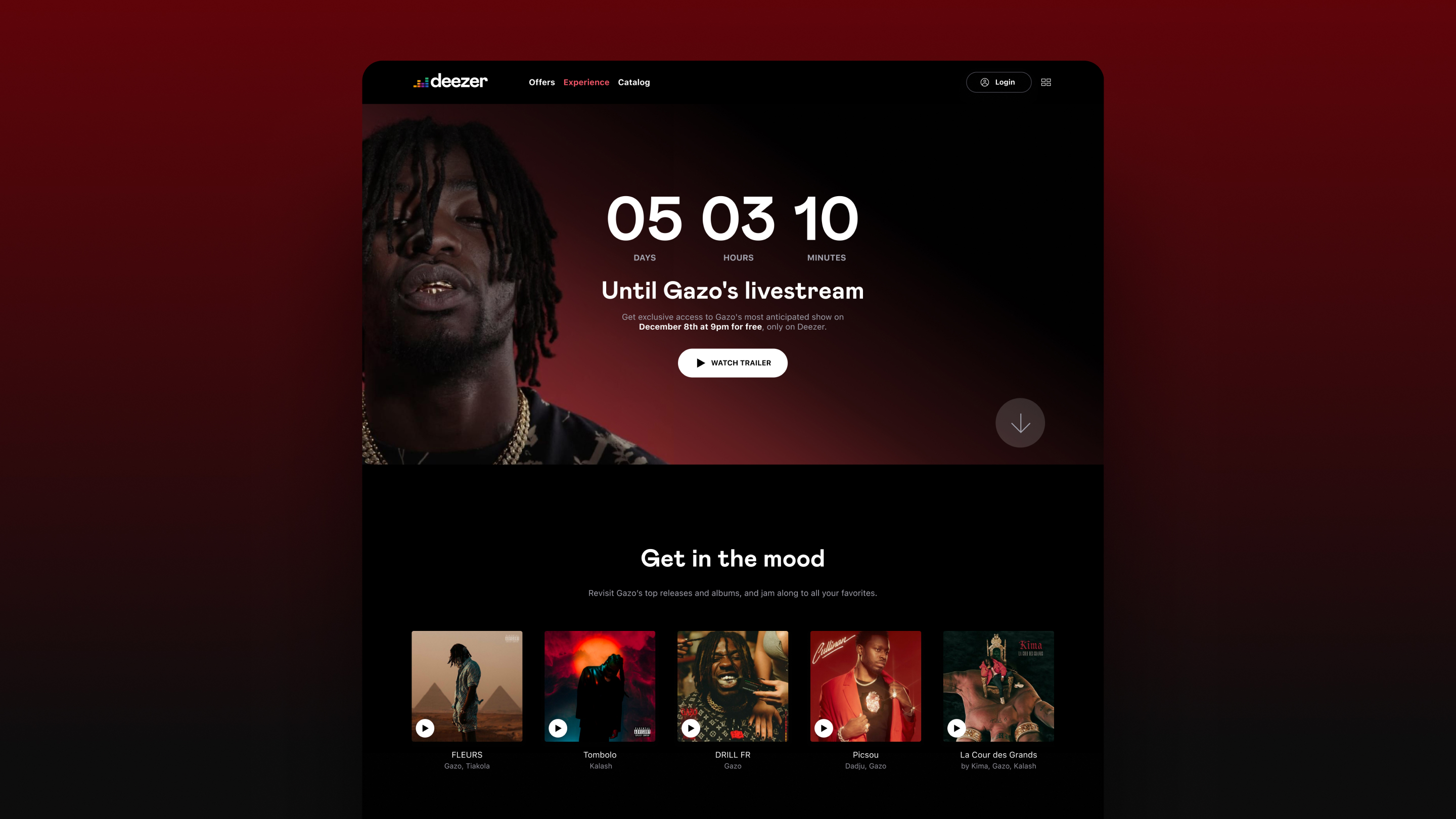
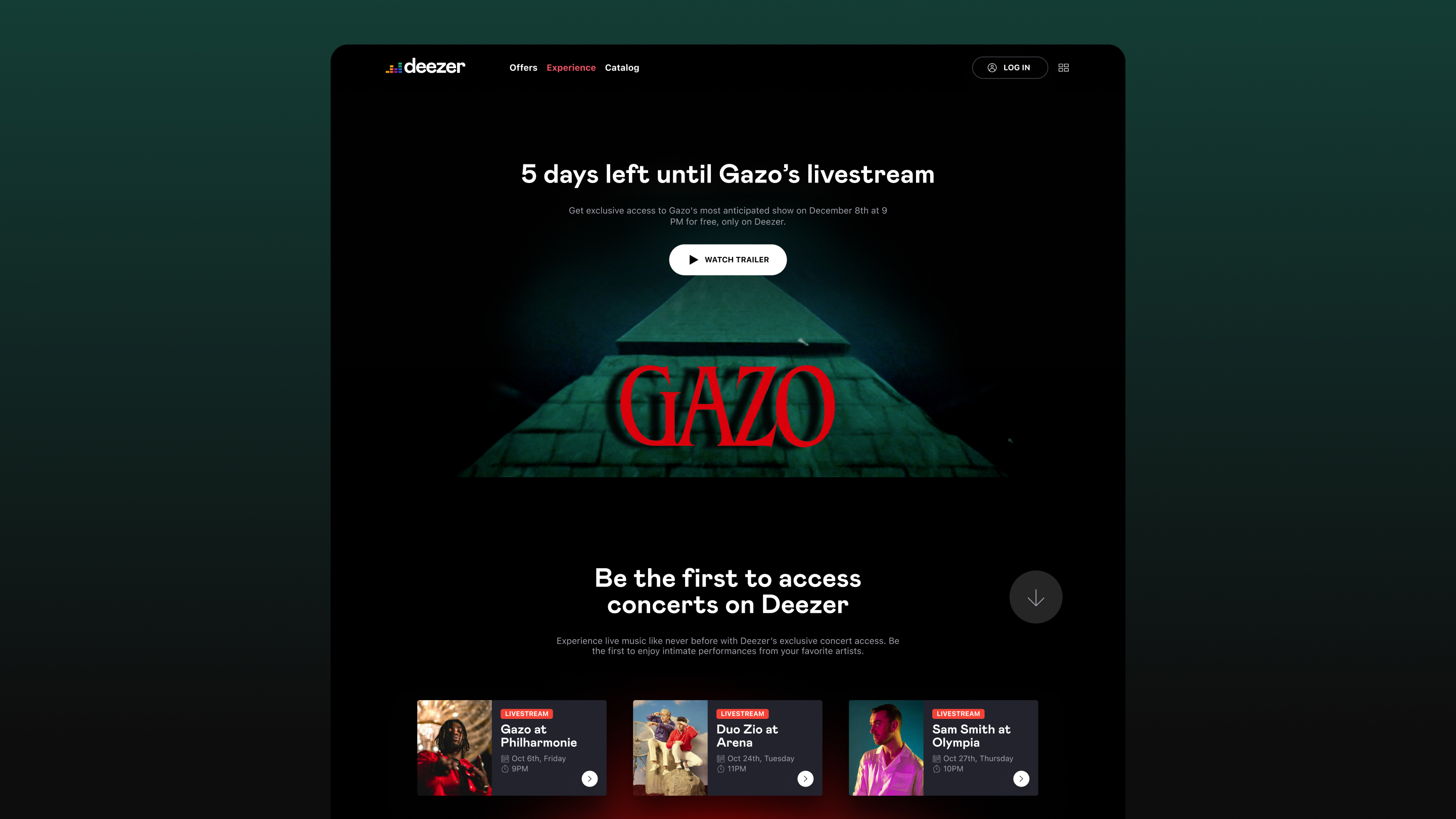
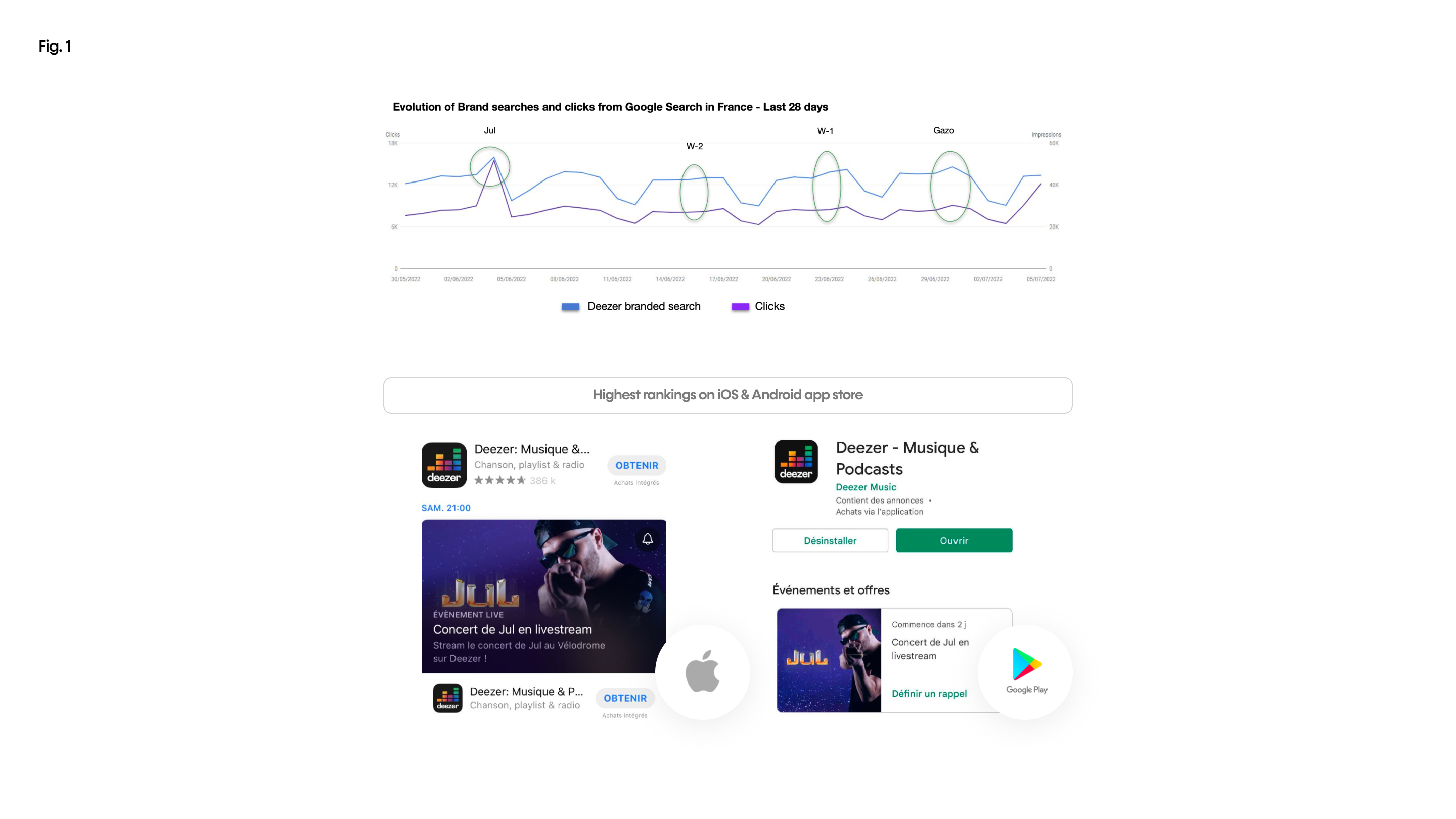
After hosting a livestream of a major French artist (‘Jul’) as a one-time event, the company experienced significant organic growth, with a 168% increase in brand searches on Google and top rankings in the music sections of both the iOS and Android app stores in France [Fig. 1]
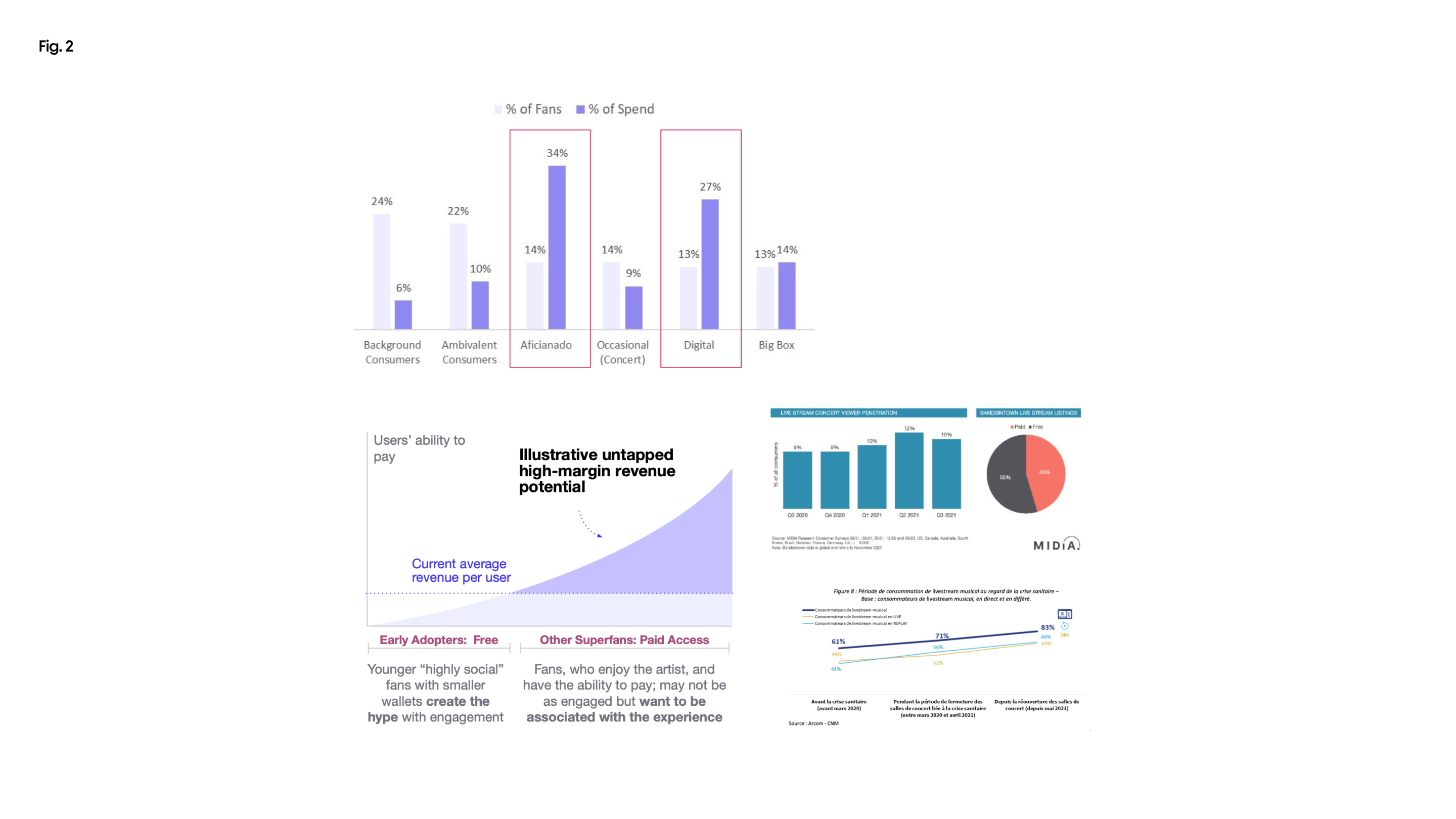
Fans who pay for music (“Aficionados”) and highly engaged trendsetters (“Digital Fans”) have a higher spending rate per fan [1]. These users, who have the means to pay, demonstrate a strong desire to connect with the experience [Fig.2].
Goal
Key findings from market research
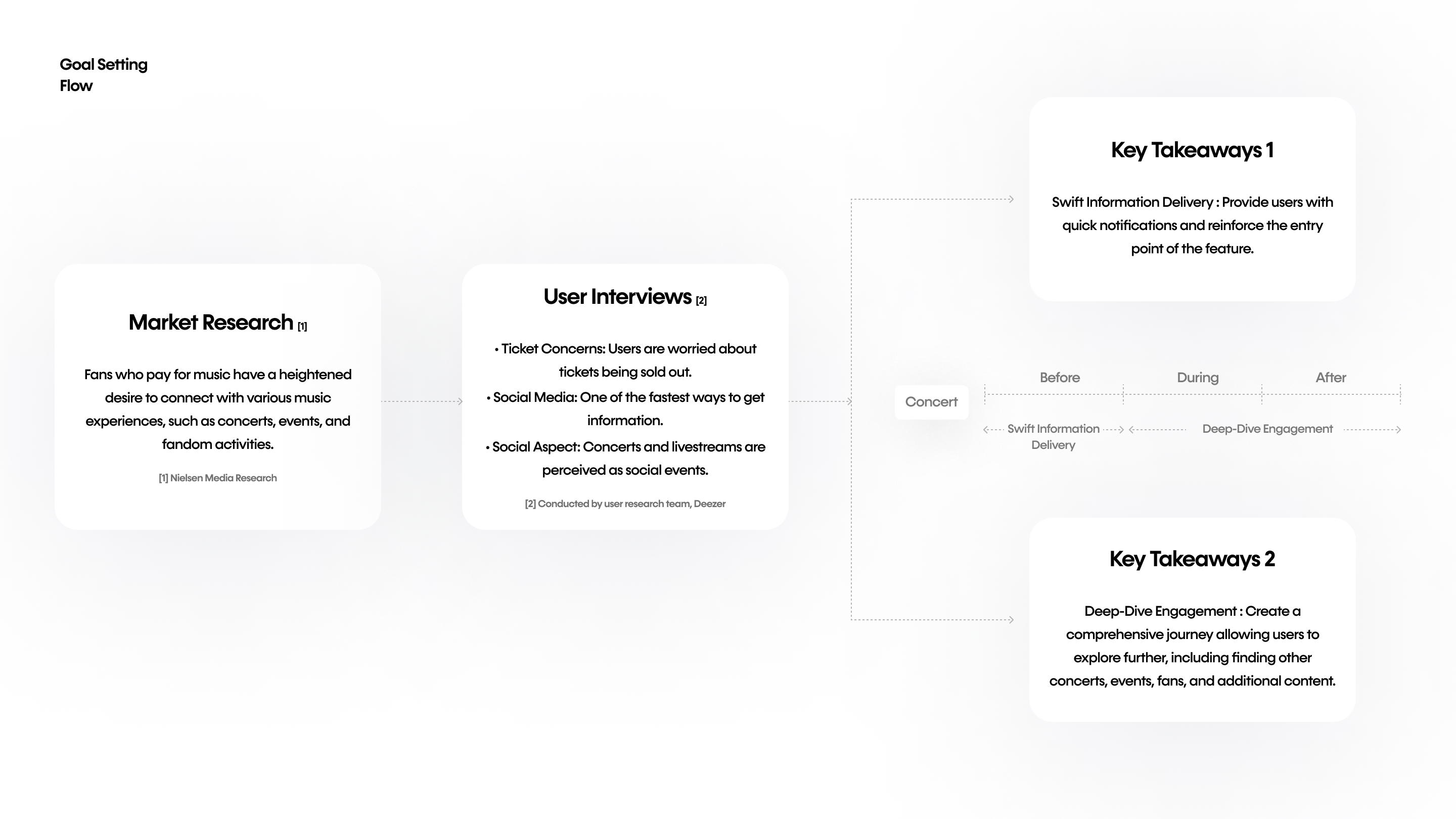
Fans who pay for music have a heightened desire to connect with various music experiences, such as concerts, events, and fandom activities. To further understand their needs, we conducted six interviews with users aged 15 to 24, gathering insights that helped define the necessary features for the product.
Highly engaged users in paid experiences expressed concerns about tickets being sold out, highlighting the importance of quickly receiving news about upcoming concerts as a crucial factor in choosing a browsing platform.
These users often discover concerts by their favorite artists on social media. Once they learn about a concert, they are more likely to seek out friends or other fans to attend with, viewing concerts and livestreams as social events.
Problem to solve
How can we ensure users are informed about concerts featuring their favorite artists as easily and swiftly as possible, allowing them to fully engage with the feature and discover more?
Design
Understanding the difference between concerts and livestreams
To provide a seamless concert and livestream journey in the app, we began by distinguishing the unique characteristics of IRL (In-Real-Life) concerts and virtual livestreams. These events have different user flows and expectations, such as punctuality, interactivity with the artist and other fans, and location sensitivity. By optimizing for these differences, we aim to create a cohesive and unified experience for all events.
Ideation
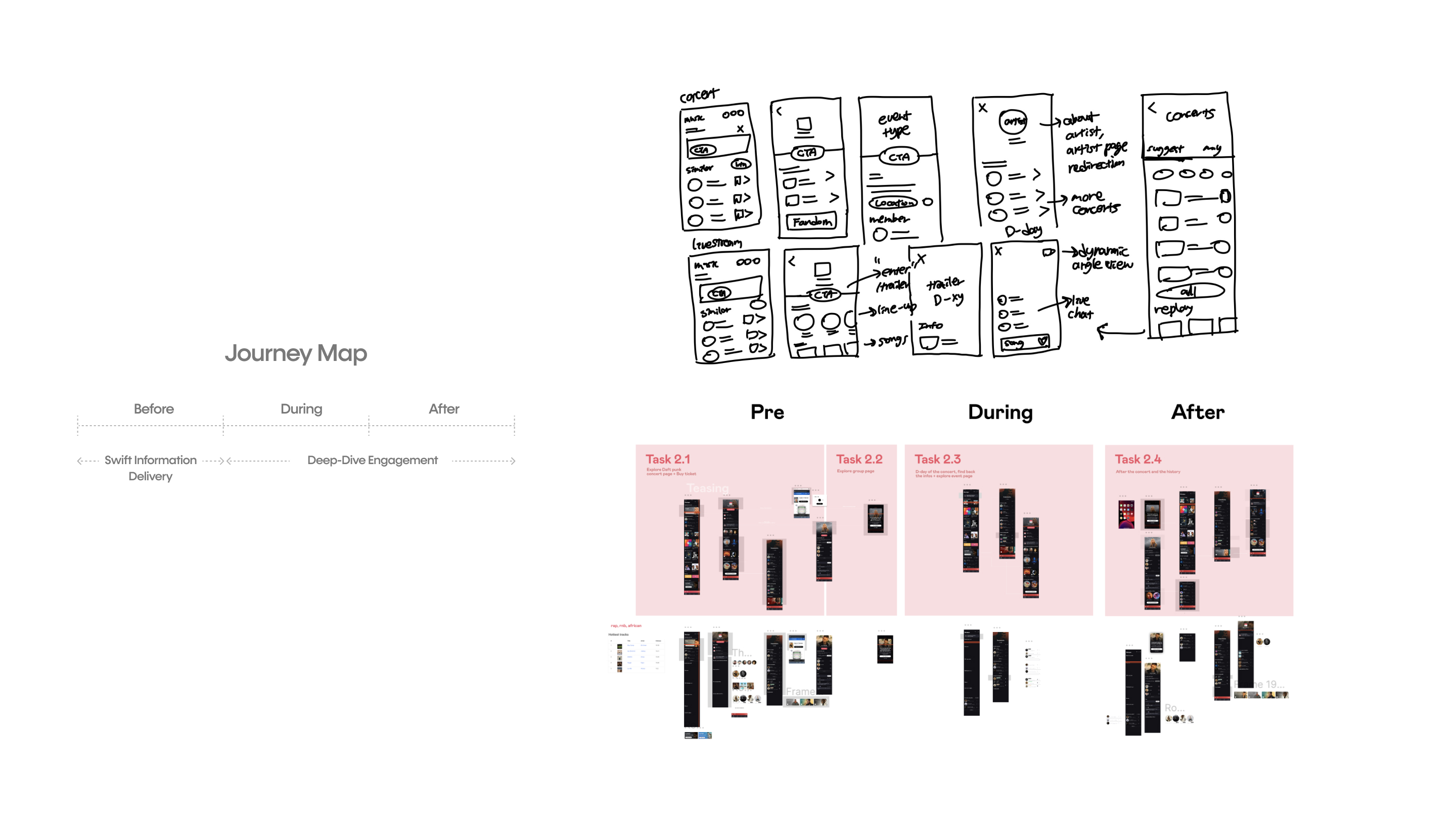
Based on market research and user interviews, we learned that swift information delivery is crucial at the beginning of the concert/livestream, while deep-dive engagement is essential during and after the event. Considering both concerts and livestreams are time-sensitive, the journey was designed in a chronological way, ensuring seamless user experience throughout all stages of the event.
Design
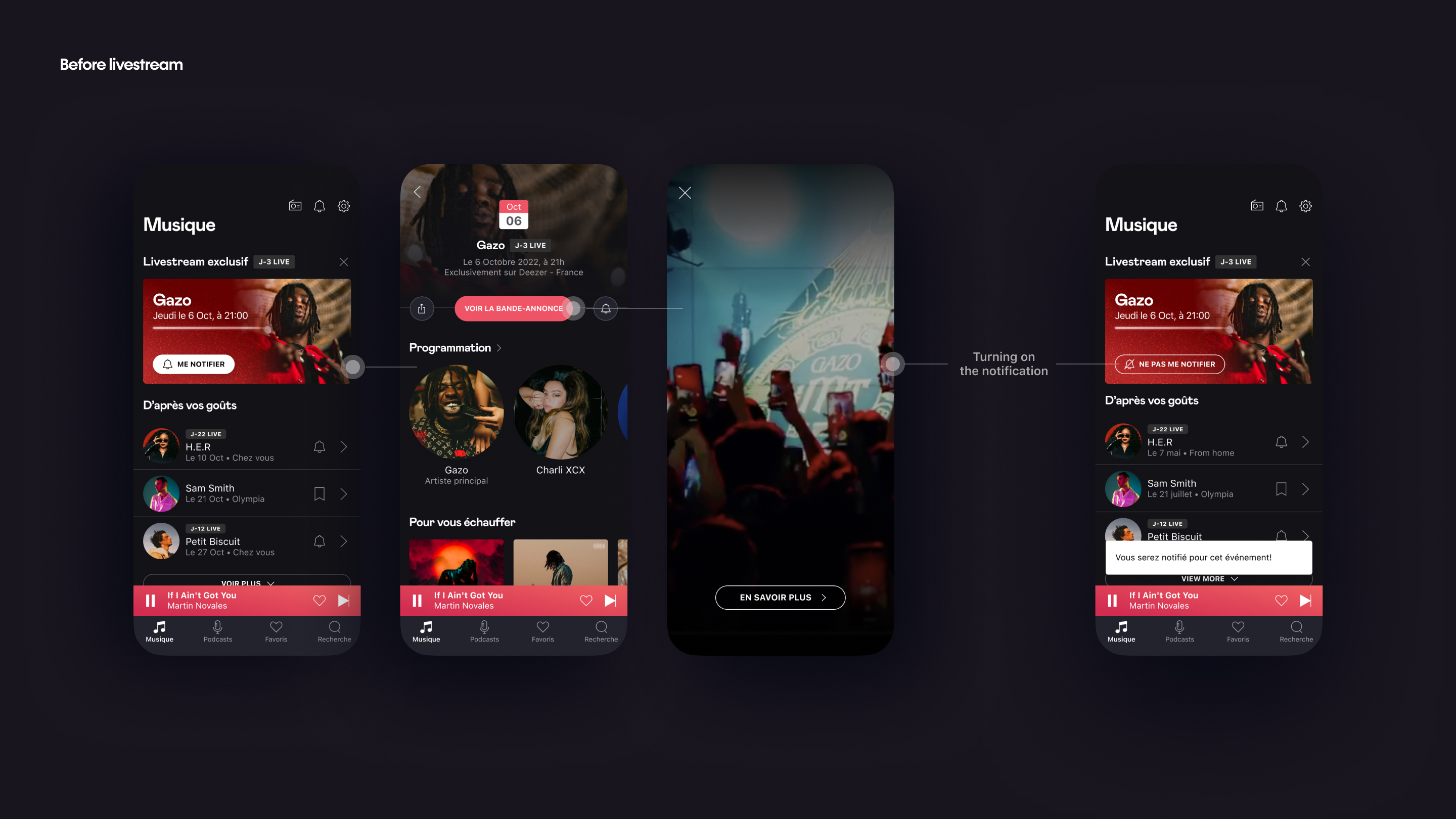
Before the event
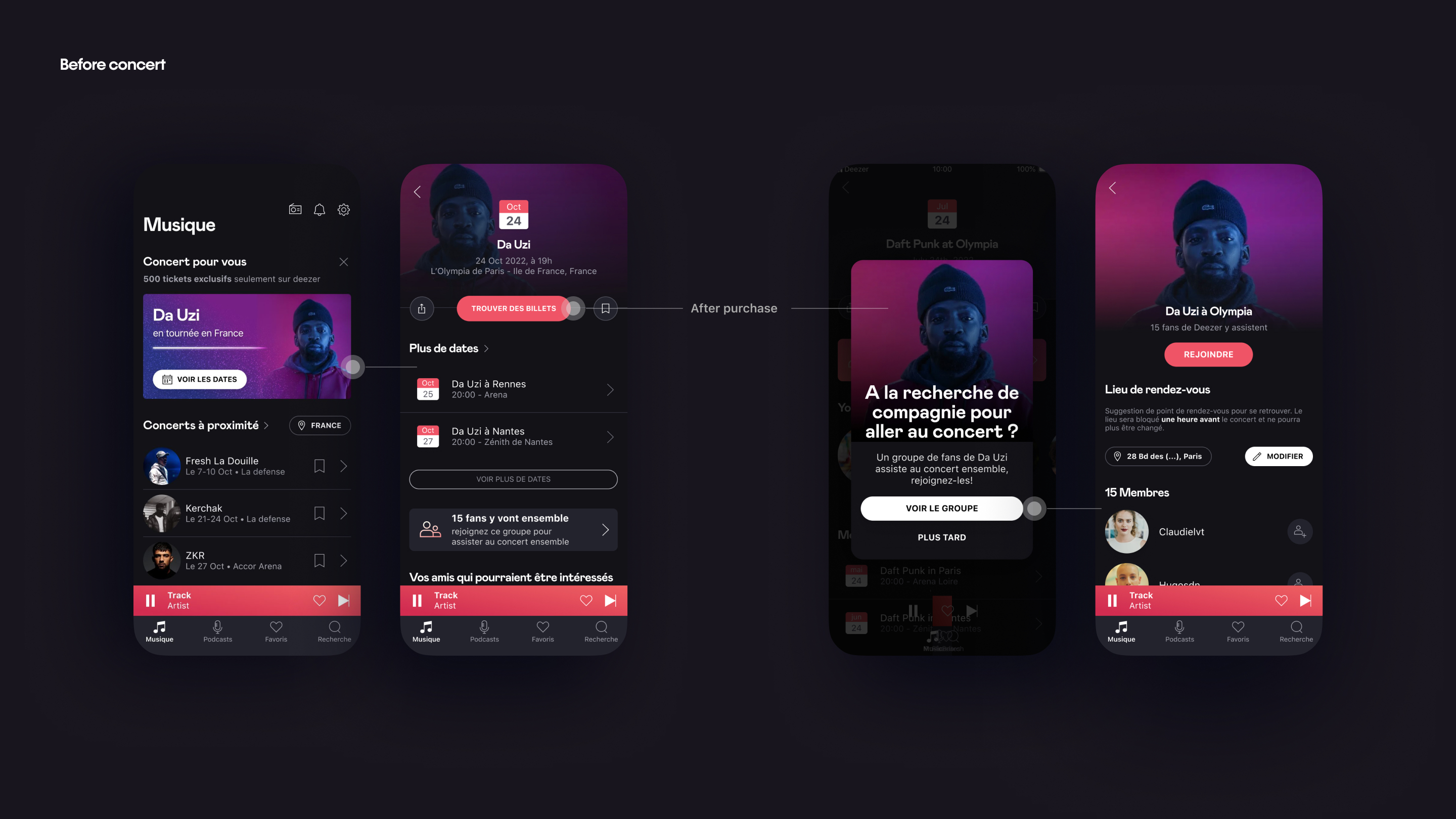
For the prototype, we designed a scenario where users receive a push banner at the top of the screen. We created two journeys to test the user flow for both livestream and real-life concerts.
IRL (In-Real-Life) Concert
Users receive a notification about their favourite artist’s concert, along with a preview of some other upcoming concerts. After deciding to purchase a ticket, they are redirected to the appropriate online ticket office. Upon returning to the app, they receive a welcoming message if they are looking for company to attend the concert with.
Virtual Livestream
For livestreams, users can easily enable notifications for the event day from the banner, ensuring they don’t miss out.
Design
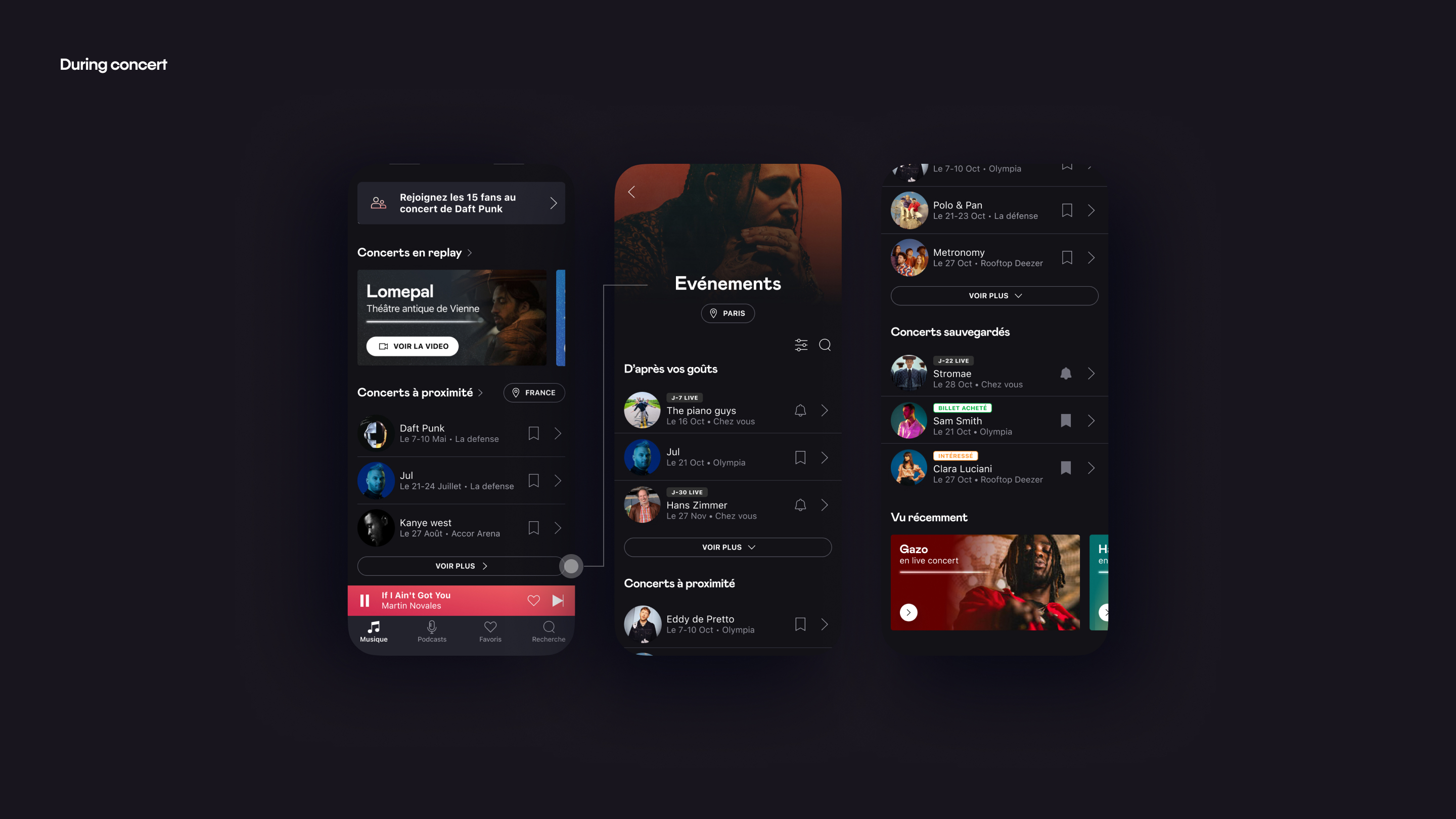
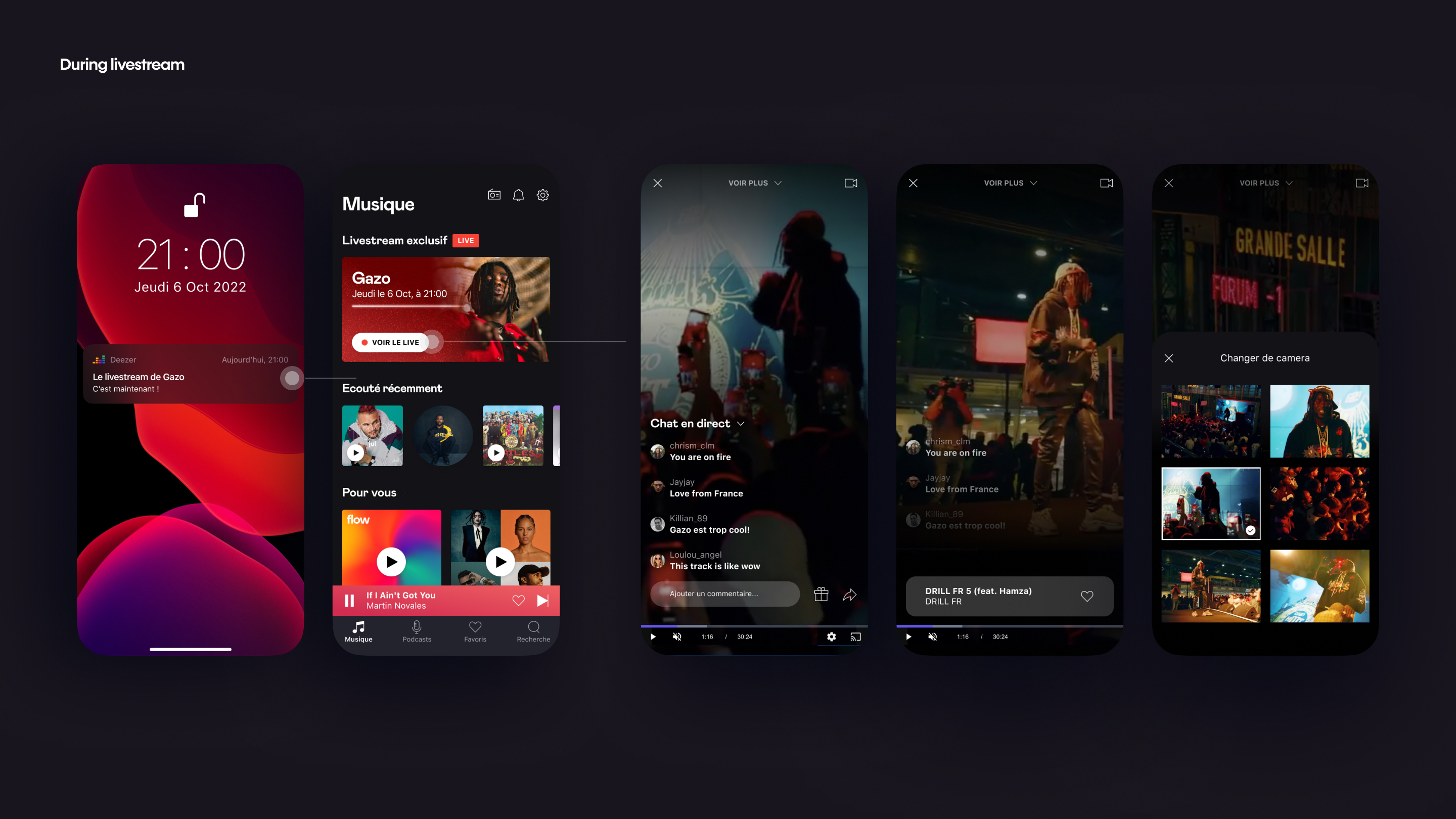
During the event
In the prototype, we envisioned a scenario where users have purchased tickets through Deezer and receive a D-day notification about the concert or livestream.
IRL (In-Real-Life) Concert
On the event day, users receive a notification about the group of fans attending the concert together. They can revisit the concert hub page to double-check the time and location of the concert.
Virtual Livestream
Users receive a notification about the livestream. A banner card appears once they open the app, allowing them to join the ongoing livestream. During the livestream, users can engage with other fans through chat, send reactions, save tracks being performed, or adjust their viewing angle.
Design
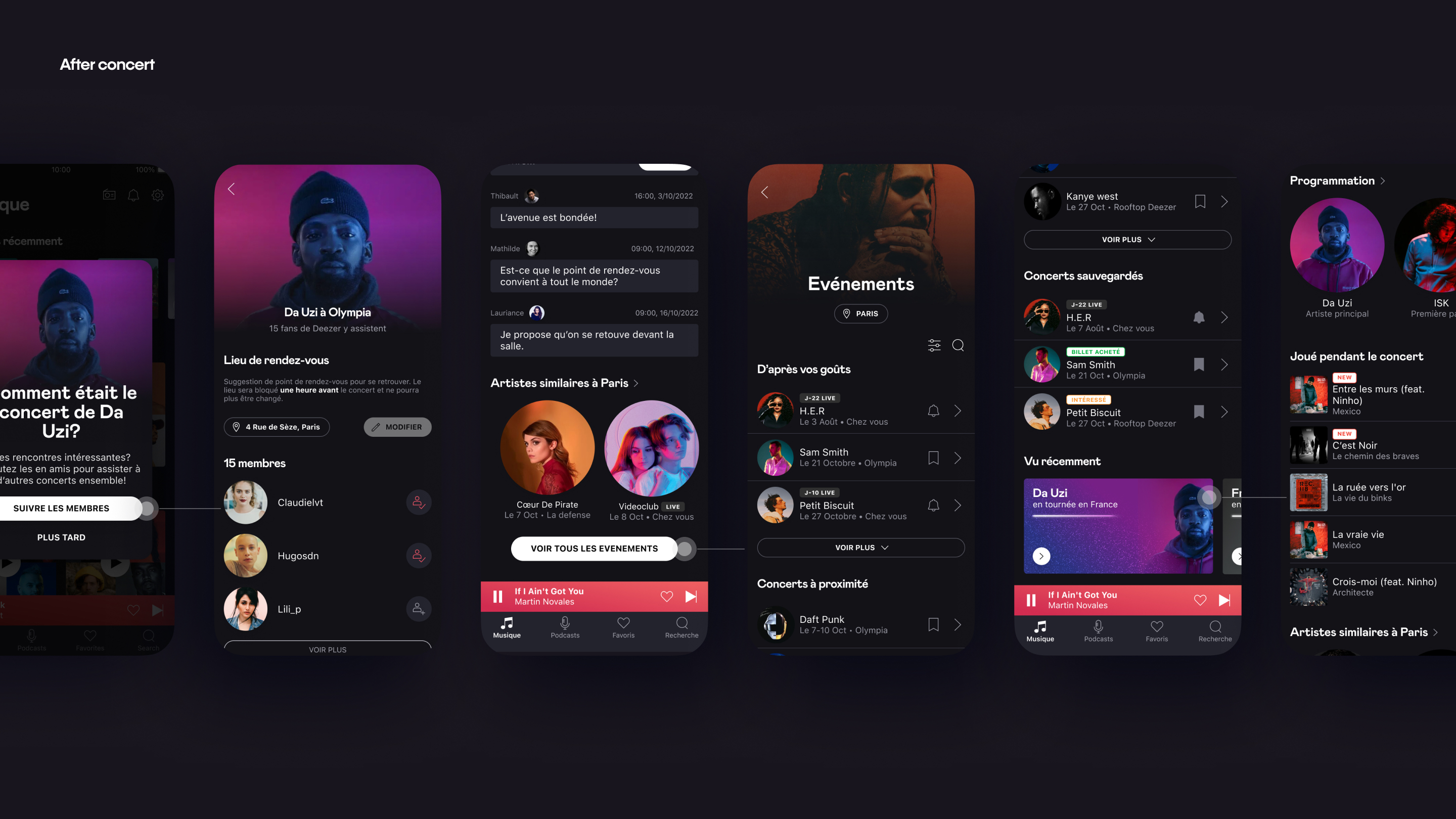
After the event
After the event, users naturally seek similar events or content to re-immerse themselves in the atmosphere, as they still feel the lingering excitement. The expectations differ slightly between IRL concerts and livestreams.
IRL (In-Real-Life) Concert
In the concert hub, users can view a list of past concerts they attended. They can see the list of fans who attended the concert and find other similar concerts liked by these fans. They can also find soundtracks performed by the artist during the concert to relive the moment.
Virtual Livestream
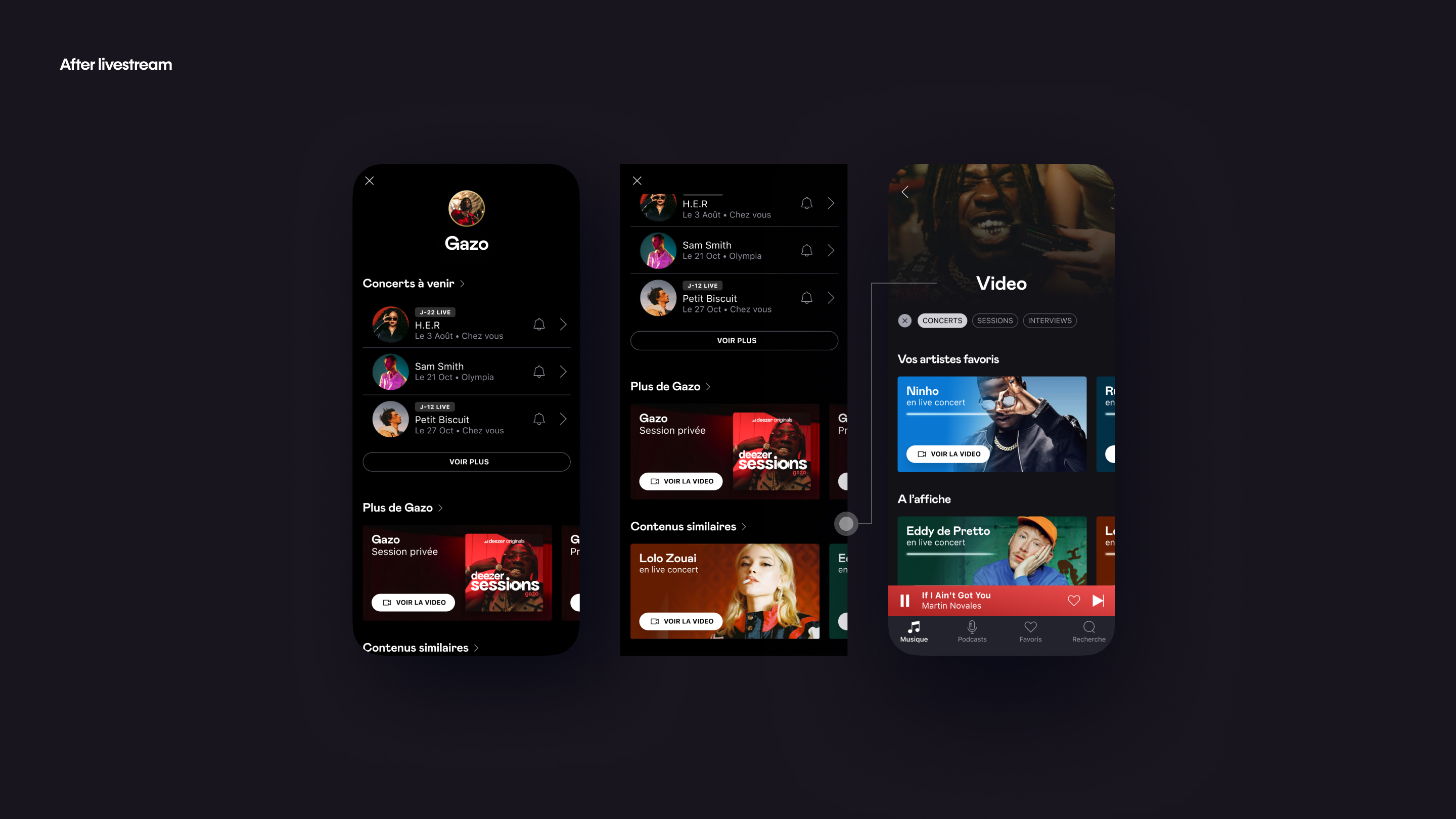
After the livestream ends, users can view additional content, such as concerts, live events, and interviews from the same artist, or other live concerts from similar artists. If users want to explore more videos, they can go to the video hub to find more replays and interviews.
User test
Targets
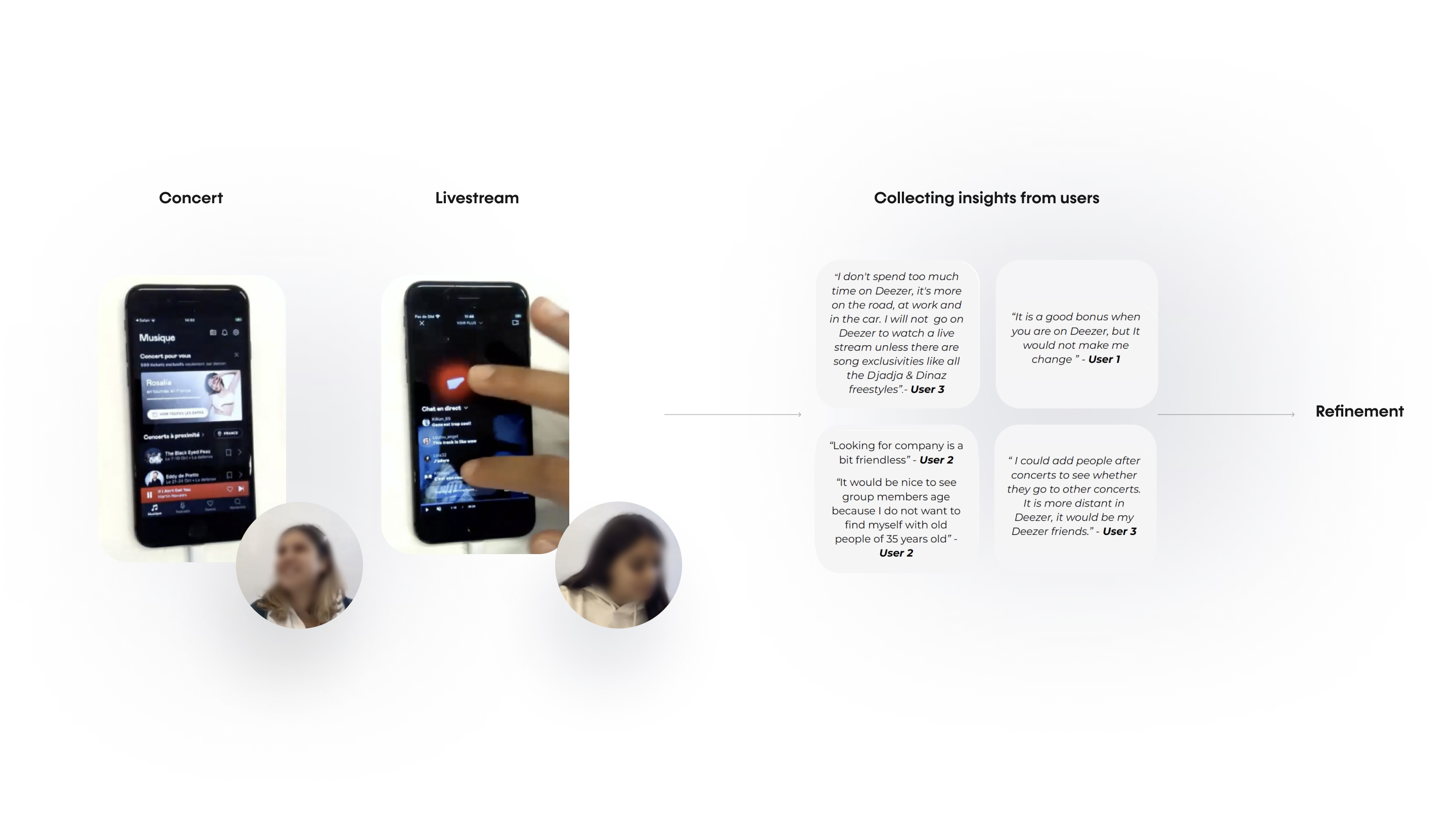
We conducted a user test with six participants aged 18–24, including both current users of the app and users from competitors. As outlined in the design above, for the IRL concert, users tested the journey to discover a concert, purchase a ticket, and receive information about other upcoming concerts. For the livestream, users tested the journey to get notified about a livestream, save it for later, join the livestream on the day, and discover more similar content.
Result
Concert
Users found the journey to be intuitive but identified some areas for improvement. They expressed a desire to join the fan group out of genuine engagement with the fandom and to share the joy together, rather than from a sense of neediness or simply seeking company (a UX-writing issue).
Additionally, users found it challenging to navigate back to the concert hub, as the entry point was at a sub-level. Once in the concert hub or video hub, users mentioned that the slideshow was unclear in indicating whether the content was a video.
Livestream
We gained valuable insights into how users perceive livestreams compared to physical concerts. While users appreciated livestreams, they primarily preferred to consume them as listening sessions rather than full-fledged concerts.
Consequently, they favored a shorter format and desired exclusive content distinct from standard concerts. Users appreciated the feature that displayed the name of the song with a button to save it to their favorite tracks. However, they also wanted to see the full list of songs played at the livestream. Unique features in livestreams, such as chatting and changing camera angles, were well-received.
Prototype for user test - concert
Prototype for user test - livestream
Refinement
Accessible entry point
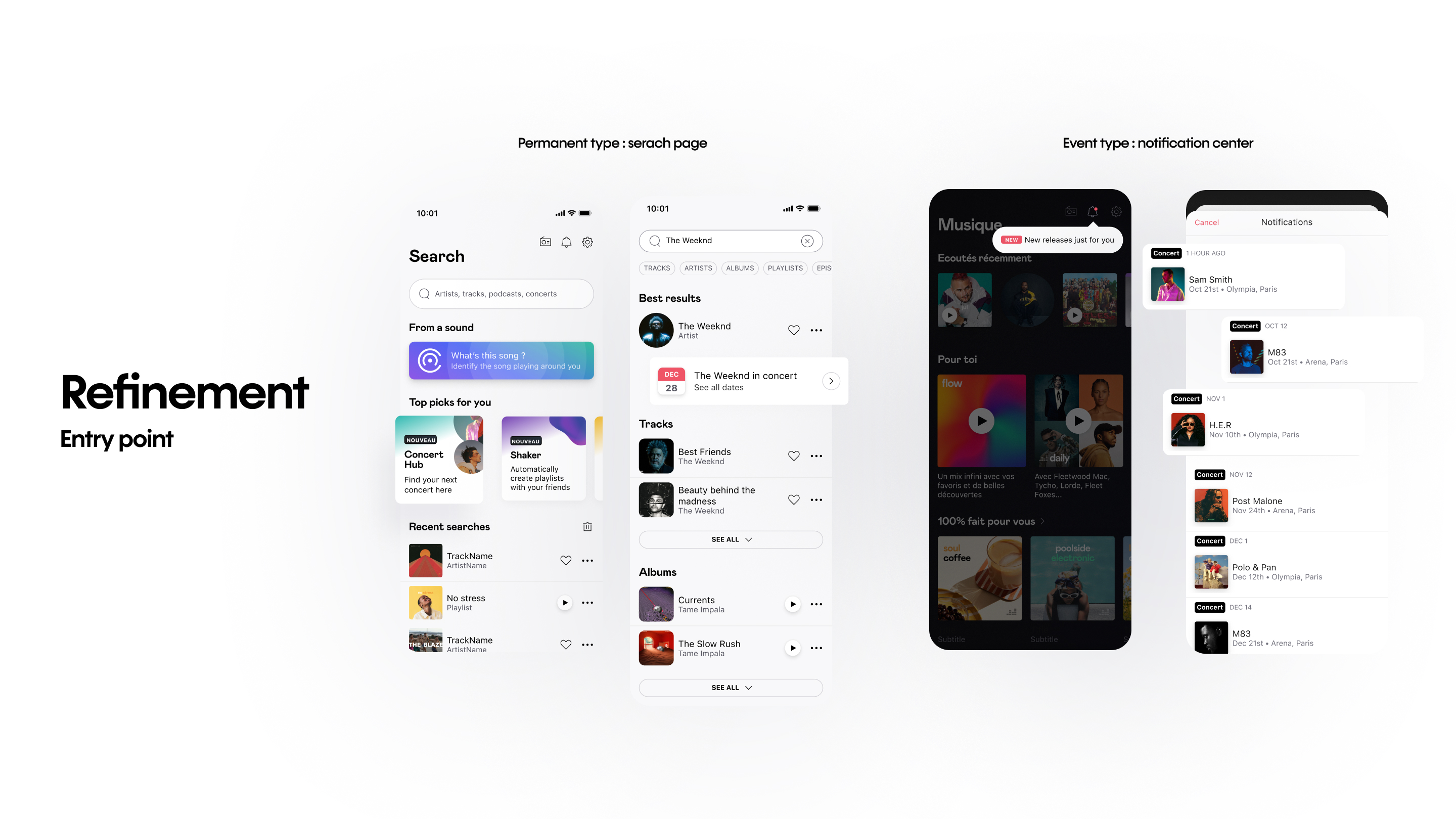
The entry point was one of the major issues of the existing concert feature. During the user test, we learned that users are looking for an entry point to this feature either in a permanent, direct way (“I know where to access it”) or in a contextualized way. We explored various moments where it would feel natural for users to be updated about the concerts of their favorite artists:
- If a user searches for an artist, we could notify them that the artist is currently performing in a nearby city.
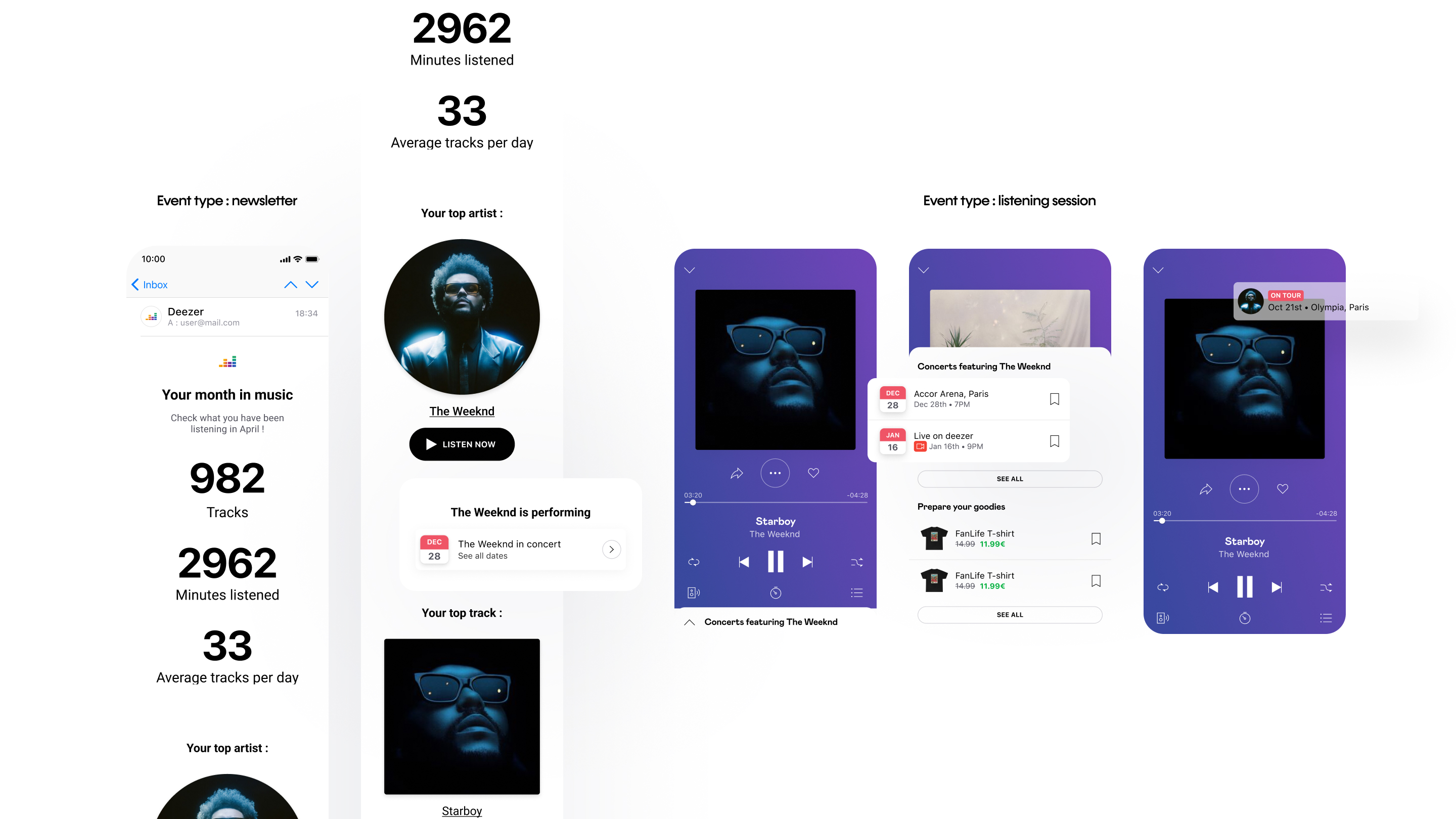
- In the monthly recurring email sent by the app, we could notify users if their favorite artists have upcoming concerts.
- If users are listening to an artist who is currently performing, we could suggest concert information on the player if they want to know more about it.
As for the direct and permanent entry point, the search page right below the search bar seemed reasonable and easy for users to access, as users tend to go to a search page when they don’t know where to find a specific item or page.
Clarity of the content type
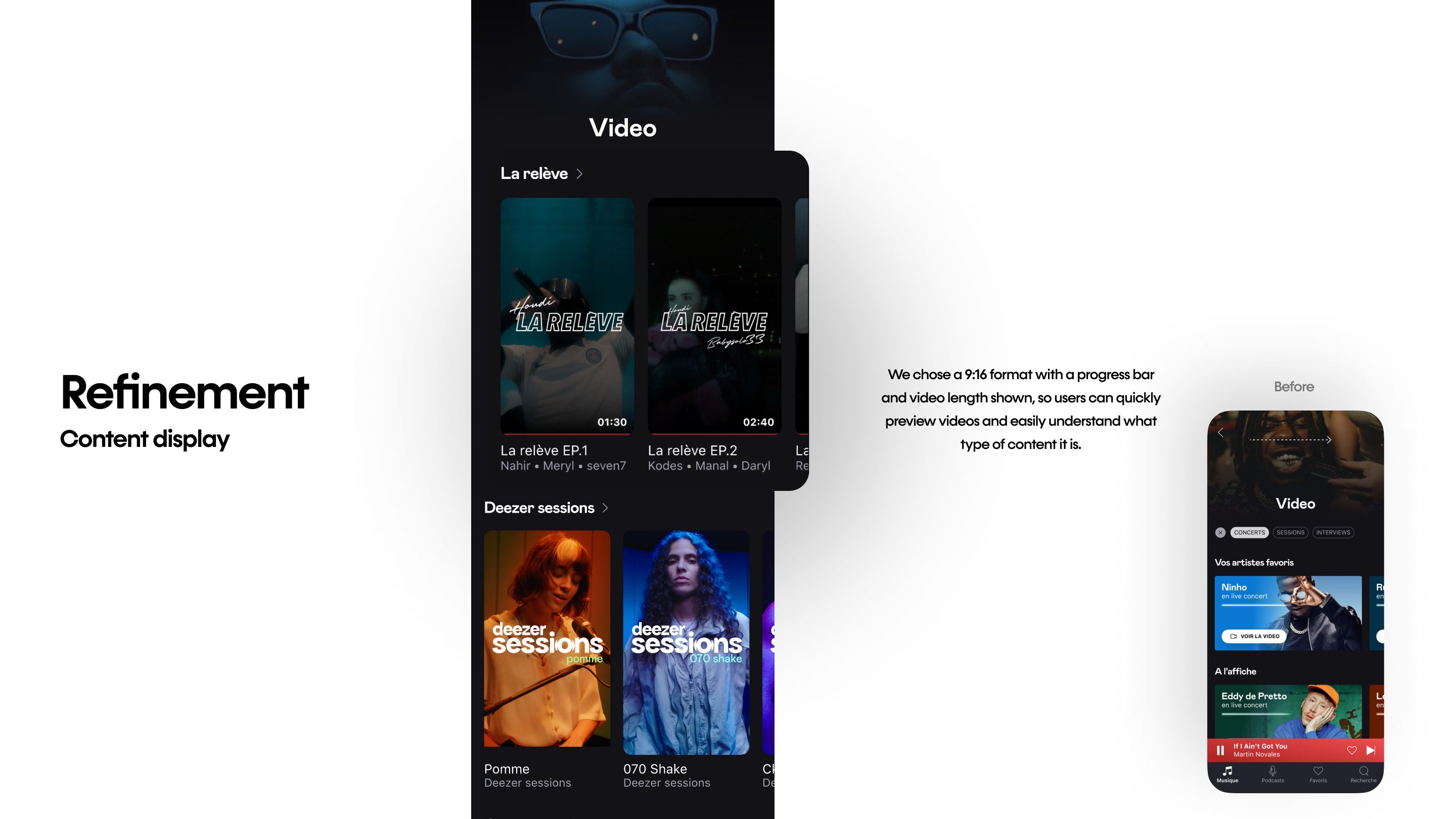
During the prototype phase, we discovered that the rectangular slideshow format lacked comprehensiveness, making it difficult for users to anticipate the type of content. Therefore, we opted for a 9:16 ratio format with a progress bar and the length of the video indicated, allowing users to view quick previews of the videos and providing clarity regarding the content type.
Separating suggestions and user’s history
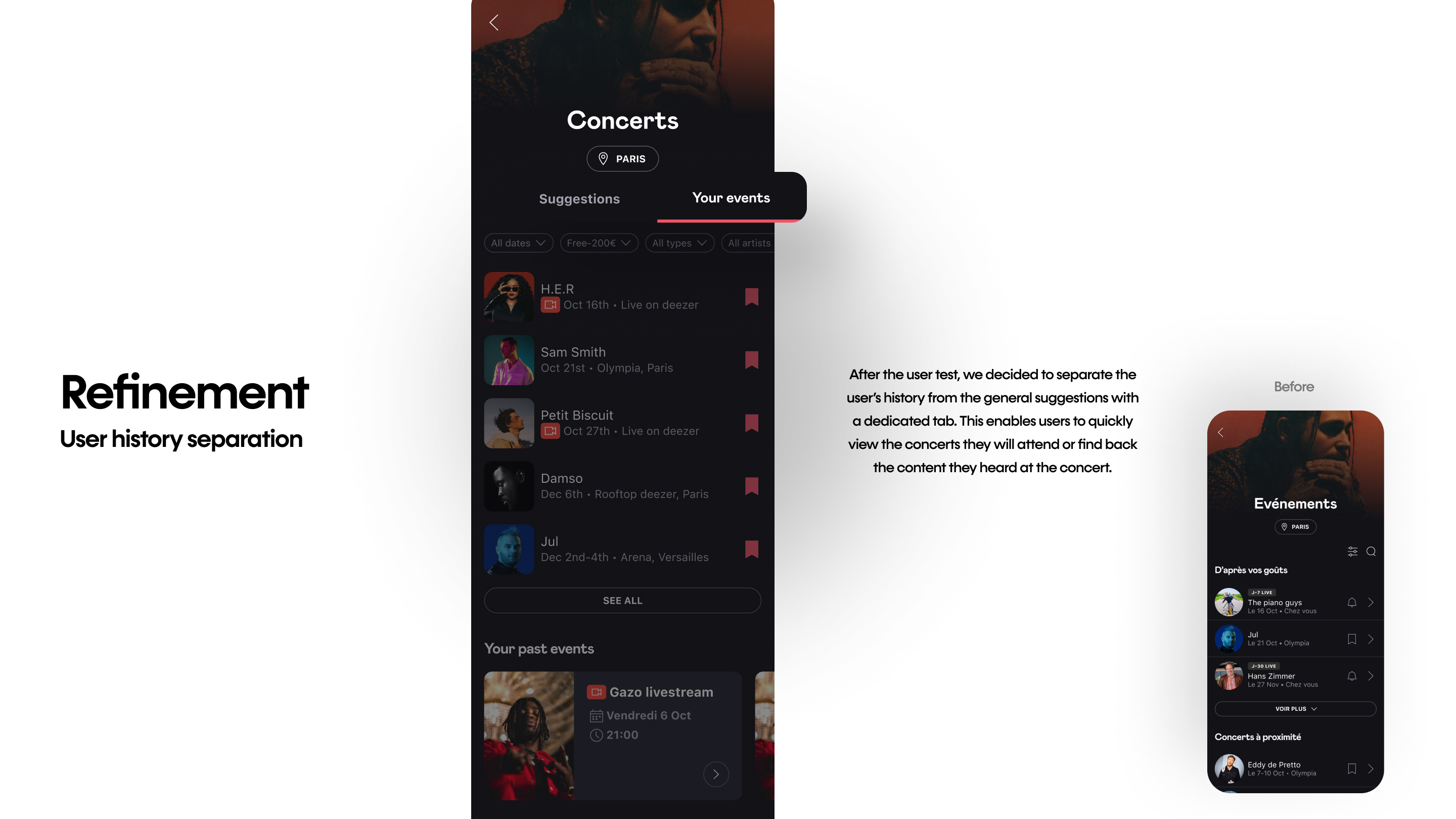
In the prototype we tested, users found the categorization in the concert hub clear to understand, but they expressed the desire to access their history faster, enabling them to quickly view the concerts they will attend or find the content they heard at the concert. Therefore, we decided to separate the user’s history from the general suggestions with a dedicated tab.
Outcome
Mobile and Desktop
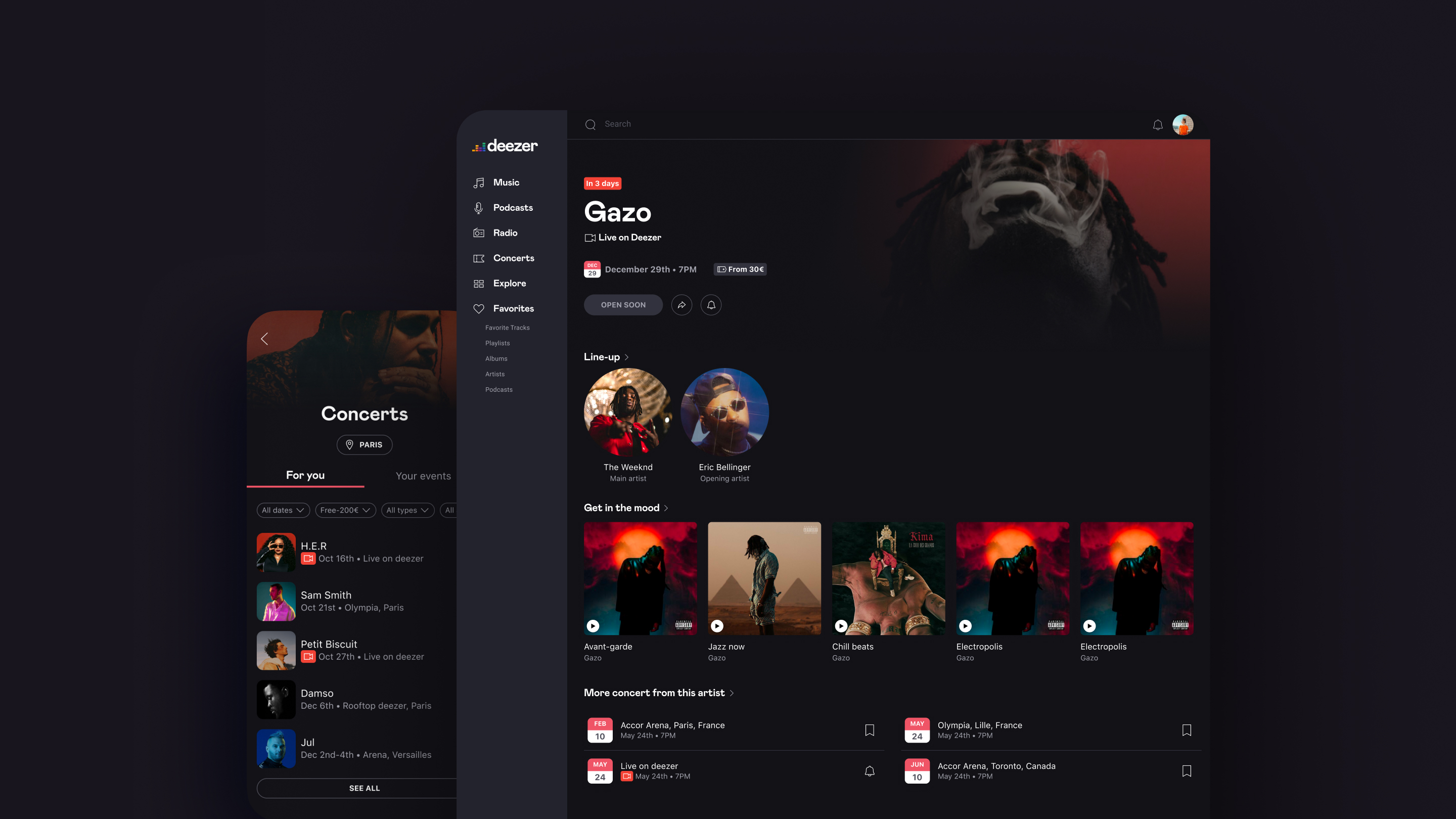
After the refinement, we launched an MVP on both mobile and desktop. Even with the same type of content, the layout had to be adjusted depending on the device. To maintain the design system and the nature of the device environment, we opted for a list format on the mobile app and a grid format on the desktop app.
Outcome
Prospect
With the success of the project, 400% increase in user interaction and engagement on this feature based on the total number of visits and spent time on monthly basis, it opened discussion with more partnerships reaching out to the companies. The company renewed their contract with partners and we have decided to continue refining the experiences along with new datas we will retrieve from this launch.
Takeaways
Underlying social desire
While researching the concert experience, we discovered that strong social values significantly drive user behavior. Concerts are not just practical events – they are deeply social experiences. Being part of a fandom, interacting with the artist, and connecting with other fans make each moment of the user journey rich with social significance.
Users often attribute additional value to experiences with a social aspect. Without this, such as in the case of simply watching a lengthy livestream, users may perceive the experience as a waste of time. The lack of interaction can make livestreams feel less meaningful compared to real-life concerts where engagement with others and the artist enhances the experience.
Introducing socially interactive features, such as a live chat, within the livestream can transform this perception. These features enable users to connect with fellow fans and the artist, reinforcing the communal atmosphere of a live concert.
Entry point, format, content
One of our primary concerns before revamping this feature was the entry point. Our major focus was on introducing the feature in a more effective way: providing a contextualized entry point to trigger it at the right moment and establishing a permanent place where users can easily find it.
However, even with the perfect entry point, if the format is not presented correctly – for instance, if users misunderstand the video as music or an advertisement – the optimal entry point and trigger moment lose their impact.
In design, everything matters. The entry point, format, and content must work together seamlessly to create a cohesive and engaging user experience.